Every peso in order, every report ready.
Record gifts and expenses in seconds, keep the receipt with the entry, follow every step from draft to posted, and hand your board a financial report and PowerPoint deck. Plan the year with budgets, track pledges, and see where your cash is heading.
- Approval stages
- 4
- Export formats
- 3
- Board pack deck
- 1 click
Linggo ng gabi — Handog
p. 214
Tithes — Fam. Reyes ₱2,000
Offering — main service ₱4,250
Resibo — nasa sobre pa
Total: ₱8,540
₱8,450 (binilang ulit… 11:52 PM)
— Ang Problema
Month-end shouldn't mean a shoebox of receipts.
Flip the card. Receipts in an envelope, totals counted twice and a board report built by hand, or one record where proof, approvals and reports live together.
Ang hirap magsara ng buwan…
Receipts in an envelope, totals counted twice
Nobody remembers who approved what
A board report that takes days of copying
Flip the card to see the fix →
— Subukan Mo
Record, prove, approve and report in five missions.
5 quick missions with a sample church. Nothing here is saved, and you need no training.
Misyon 1 of 5
Record this Sunday's offering. Check the amounts and submit it for approval.
Press Submit for Approval
Record transaction
TRX-202610-0042, assigned automatically
Total ₱4,250
Illustrative sample. Your screens will show your church's own content.
— Mga Misyon
Try it yourself
— Ang Tunay na Screen
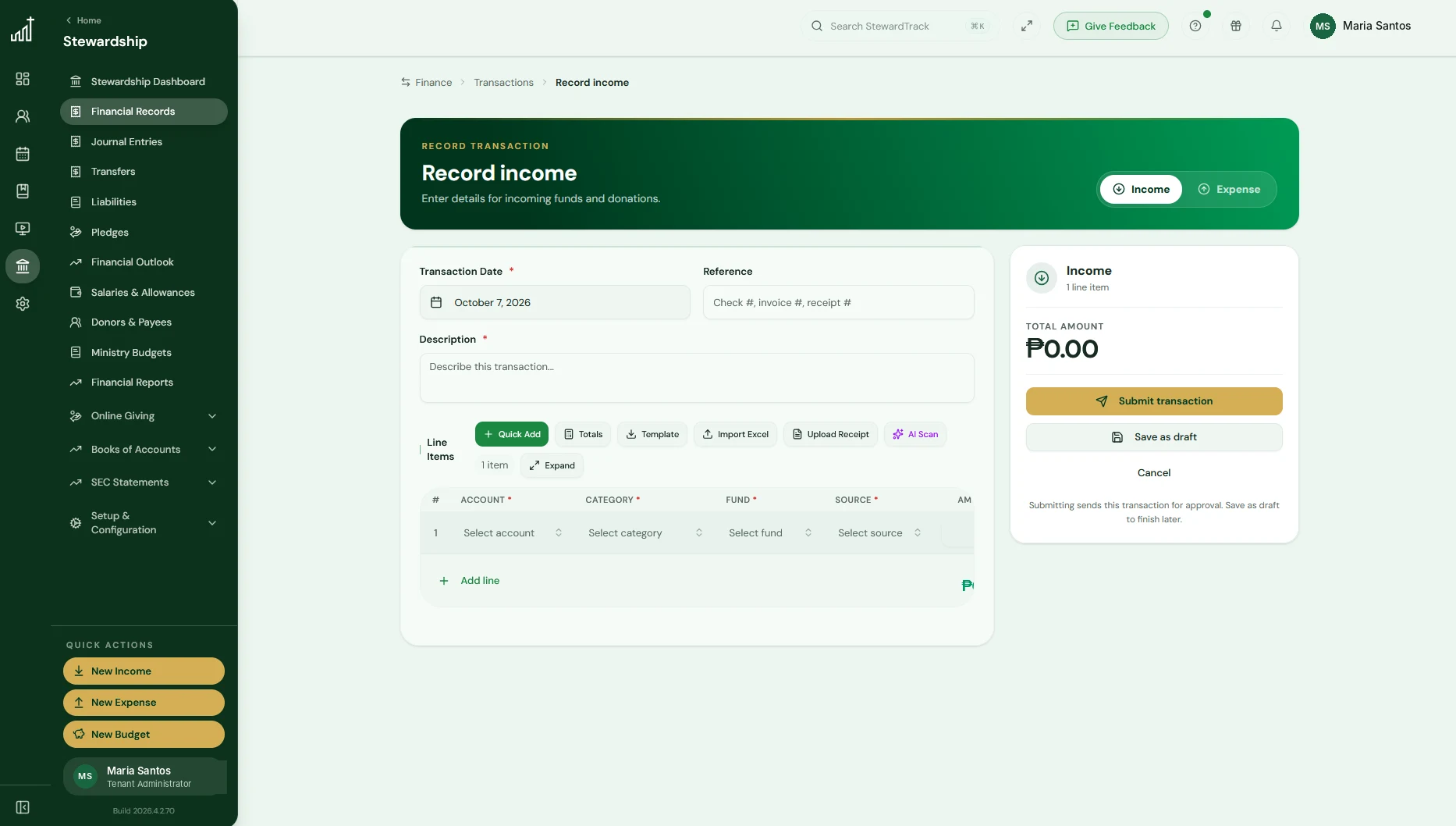
The real Record income screen.
Pick the date, fund and category, add your lines, attach the receipt and save. Import from Excel or let AI Scan read the receipt for you.
— Ang Tunay na Screen
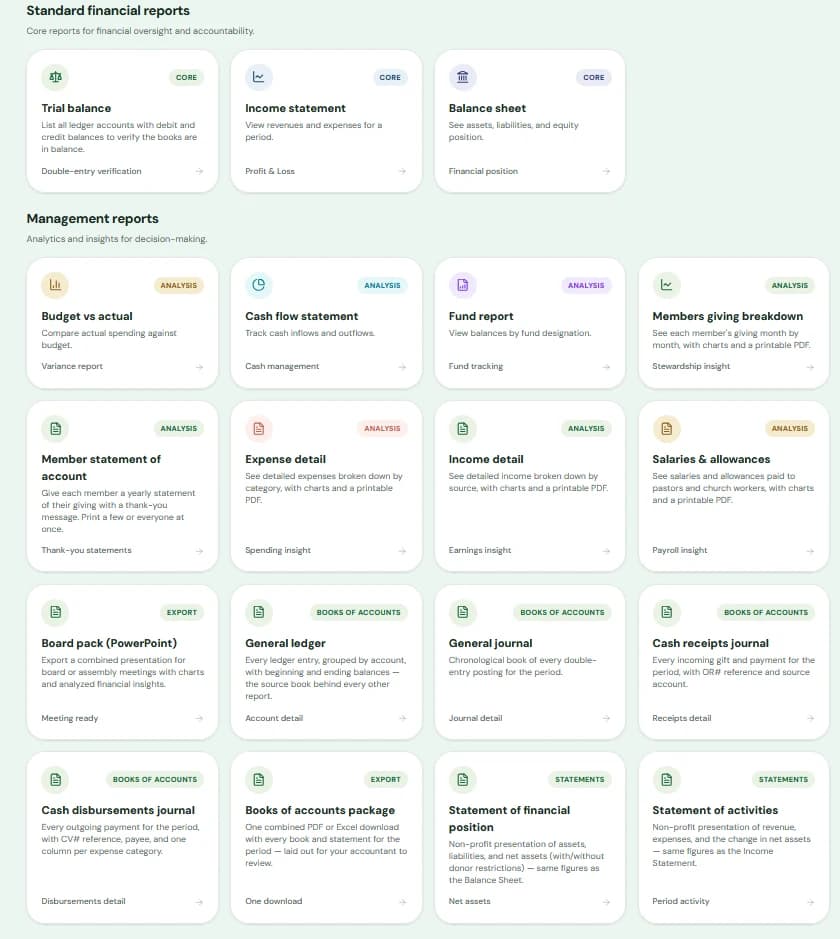
Every report your board asks for, ready to open.
Standard and management reports, the board pack, books of accounts and statements all live in one Financial Reports page.
— Madali Lang
Easy for a treasurer, clear for the board.
Hakbang 1
Record in seconds
Use the form, the guided Quick Add on your phone, or import rows from Excel. Numbers are assigned for you and the books always balance.
Hakbang 2
Keep the proof with the entry
Attach receipts as images or PDFs, or scan one with AI to fill in the details. View them from the transaction any time.
Hakbang 3
Everyone sees the same trail
Draft, submitted, approved, posted. Each step is on the history with who acted and when.
Hakbang 4
Reports are already waiting
Open the statements and management reports whenever you need them, and turn them into a board pack PowerPoint.
Hakbang 5
Plan the year
Set your fiscal year, then give each ministry fund and budget a limit. Budget vs actual updates as you record, and every gift and expense is tagged by fund and source, so you always know where the money came from and where it went.
Hakbang 6
Track pledges, see what's ahead
Run giving campaigns where members commit over time, with automatic installment schedules and statements. Financial Outlook then forecasts your cash so you can spot a shortfall before it arrives.
— Isang Subscription
One plan. Everything below, included.
No add-ons and no separate tools to pay for. Tap what your church uses today.
What do you use today?
Tap the tools your church uses.
See how many you can retire.
Included in your StewardTrack subscription
- Treasury overview with cash, income and expenses at a glance
- Transactions with an approval workflow and history on every entry
- Receipt upload and AI Scan, plus Excel import and export
- Fiscal years with monthly periods you can close once reconciled
- Ministry funds, income and expense sources, and categories
- Ministry budgets with budget vs actual and alerts when one is at risk
- Pledge campaigns with member pledges, installment schedules and statements of account
- Financial Outlook: cash forecast, early warnings, scenarios and a can-we-afford-it check
- Income statement, balance sheet, trial balance, cash flow and fund report
- Exports to PDF, Excel and CSV
- Board pack PowerPoint with board meeting and church assembly presets
Core finance tools, budgets and funds come with every plan. Pledge tracking, financial reports and analysis start on Premium, Financial Outlook on Professional, and Advanced Reports with the board pack PowerPoint are part of the Enterprise plan. AI Scan uses your AI credits.
— Mga Tanong
Questions, answered honestly
— Isulat ang Susunod na Entry
Give your treasurer, and your board, one clear record.
Start free, no credit card, no obligation. Nothing you tried above was saved. Your first real entry starts here.
Ready when you are.
10-minute setup, no credit card
Start on the free plan
A real Filipino helps you get started